How I built AI chat for Coinquer
Chat is now part of Coinquer, the mobile app I've been building solo, and I recently finished wiring an AI assistant into it.
In this post, I'll walk through the two core flows that make the chat work, and explain a decision I made early on that ended up paying off: splitting response generation into its own endpoint instead of bundling it into the endpoints that create conversations and send follow-up messages.
Two entry points, one shared step
There are really only two things a user can do to trigger the AI: start a new conversation, or send a follow-up message in an existing one. Both flows look almost identical once you zoom out, which is exactly the point — they share a step.
Creating a conversation
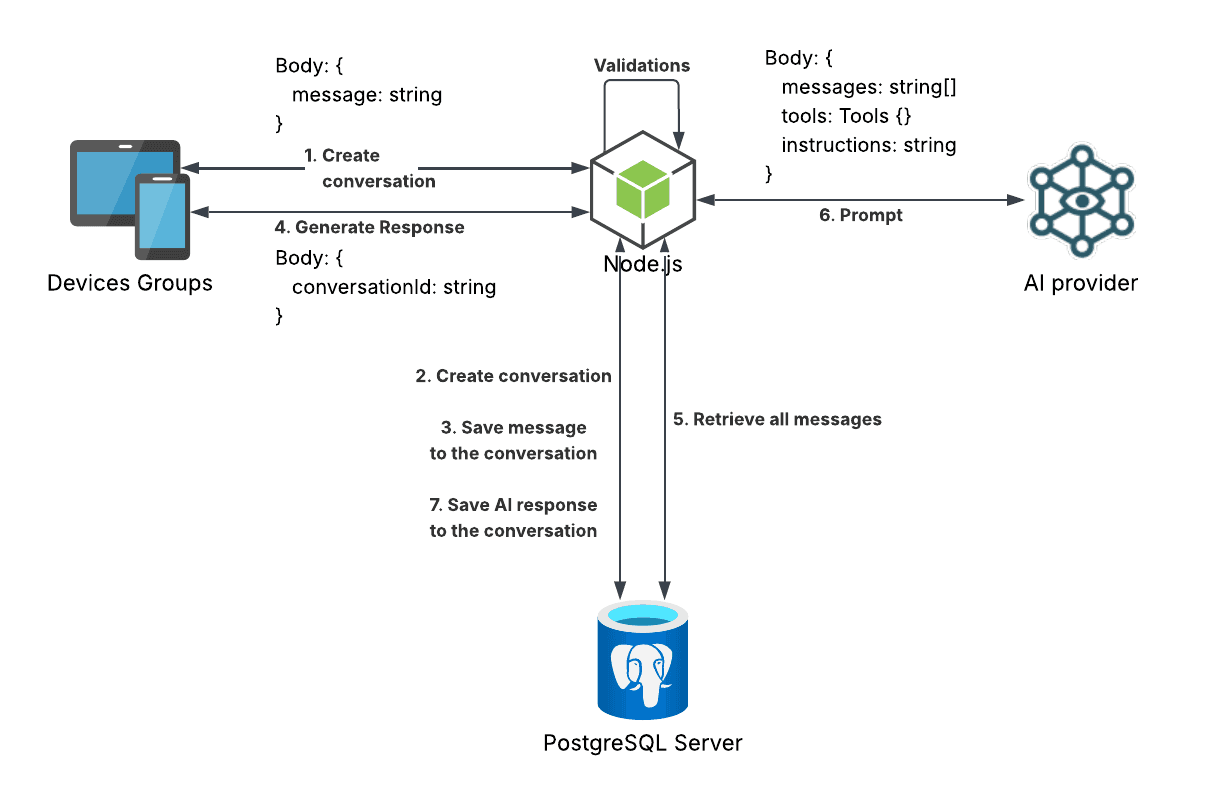
Here's what happens when a user sends the very first message of a conversation:
- FE calls
POST /conversationswith{ message: string } - BE creates the conversation
- BE saves the message to the conversation
- FE calls
POST /conversations/:conversationId/generate-response, no body needed - BE fetches all messages in the conversation
- BE prompts the AI with
{ messages, instruction, tools } - BE saves the AI's response back into the database
Notice that creating the conversation and generating a response are two separate round trips from the frontend. That's deliberate, and I'll get into why below.
Sending a follow-up message
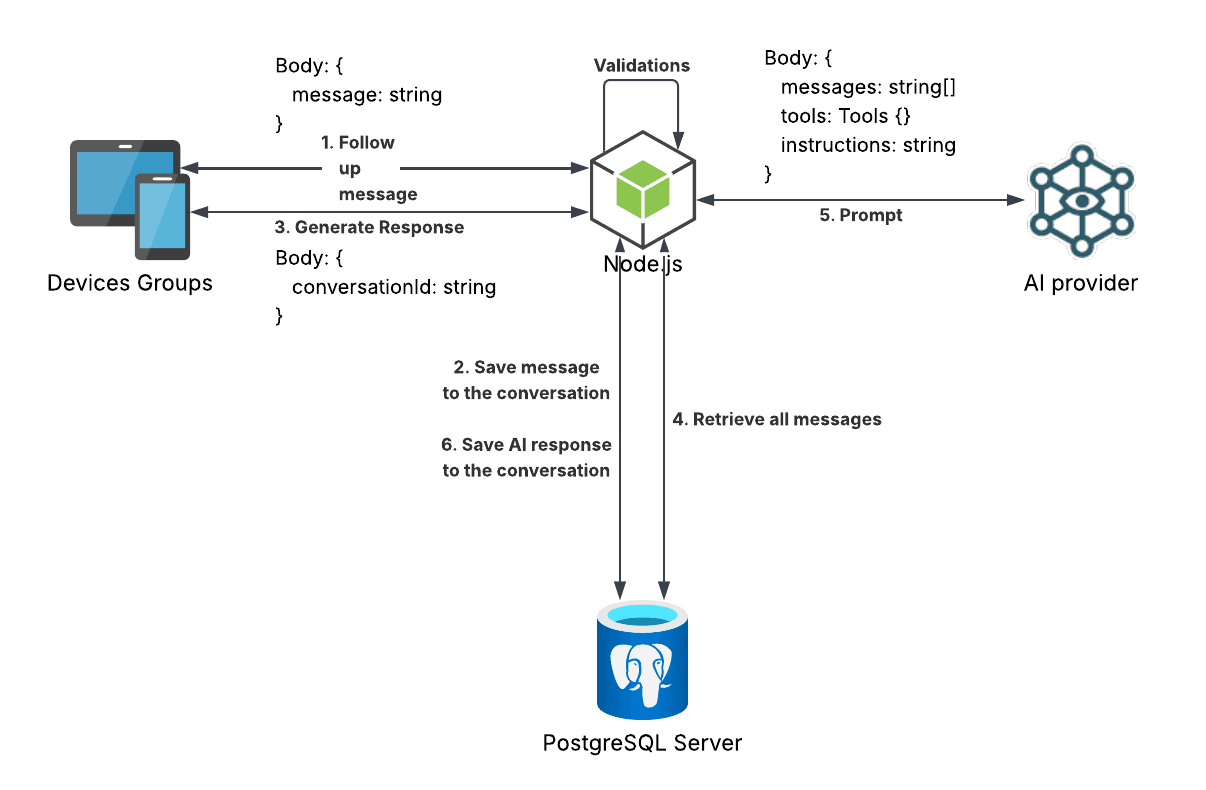
Once a conversation exists, every subsequent message follows almost the same shape:
- FE calls
POST /conversations/:conversationId/follow-upwith{ message: string } - BE saves the message to the conversation
- FE calls
POST /conversations/:conversationId/generate-response, no body needed - BE fetches all messages in the conversation
- BE prompts the AI with
{ messages, instruction, tools } - BE saves the AI's response back into the database
The only real difference from the first flow is that step 1 doesn't need to create a conversation — it already exists. Everything from generate-response onward is identical.
Why generate-response is its own endpoint
The obvious way to build this would be to fold response generation directly into POST /conversations and POST /conversations/:conversationId/follow-up. Save the user's message, prompt the AI, save the response, return everything in one request. Fewer round trips, simpler client code.
I didn't go that route, and the reason comes down to one word: retryability.
AI calls fail. Rate limits, timeouts, provider outages, malformed tool calls — there's a long list of things that can go wrong between "user sent a message" and "AI responded." If response generation were baked into the same request that saves the user's message, a failure there would put me in an awkward spot: do I roll back the saved message too? Do I leave an orphaned user message with no reply and no easy way to recover?
By making generate-response its own endpoint, I get a clean separation:
- Saving the user's message always succeeds independently of whatever the AI does next.
- If
generate-responsefails, the conversation is left in a well-defined state — a user message with no AI reply yet — and I can show a "Retry" button that just callsgenerate-responseagain. - The retry doesn't need to know or care whether it's the first message in a new conversation or the tenth follow-up. It only needs a
conversationId.
That last point is what made the two flows converge the way they do. Once conversation creation and follow-up messages both end with a call to the same generate-response endpoint, retry logic becomes one implementation instead of two.
Scoping tools to the authenticated user
Coinquer's AI assistant has tools — it can look up data to answer questions. That's also exactly the kind of thing that goes wrong if you're not careful: what stops the AI from being tricked into fetching another user's data?
My answer was to make it structurally impossible rather than relying on the AI to behave. Each tool is a function that takes an identifier and returns the actual tool definition, already bound to that identifier:
import tool from "./tool";
// ... a bunch of others

const tools = {
  tool,
  // ... a bunch of others
};

export default function initToolsForUser(userId: string) {
  return Object.keys(tools).reduce((results, key) => {
    const callback = tools[key as keyof typeof tools];

    return {
      ...results,
      [key]: callback(userId),
    };
  }, {});
}
I'm using AI SDK to talk to the model, and initToolsForUser is called right before the actual prompt call:
import { generateText } from "ai";

const tools = initToolsForUser(userId);

const aiResponse = await generateText({
  ...config,
  tools,
  instructions: `You are an AI assistant for coinquer ...`,
});
The result gets passed in as the tools the AI can call. The important part is what's not there: none of the individual tool signatures accept an identity or scope parameter. Every tool only ever takes the arguments relevant to what it does — never a userId or similar identifier for the AI to fill in, correctly or otherwise. The scoping already happened in initToolsForUser, before the AI ever sees the tool.
So even if a message manages to trick the AI into trying to call a tool to reach into someone else's data, there's no parameter through which it could specify whose data. The tool is already closed over the authenticated user's identity by the time the AI gets access to it. This isn't a prompt-level defense that can be argued around — it's just how the function is built.
Other approaches I considered
Before settling on this closure-based init pattern, I looked at what AI SDK itself offers for this — mainly toolsContext/contextSchema and toolApproval. Worth documenting why neither replaced what I built:
toolsContext / contextSchema — this is the SDK-native way to scope a tool's execution context server-side, and security-wise it does the job: the model never sees or supplies the scoped value, so it can't forge it. The drawback is that context is declared per tool, not globally. Since almost every one of Coinquer's tools needs the same userId, using this as-is means repeating that value across every tool's context entry — real duplication for something that's fundamentally one global value, not many per-tool ones. Workable, but it trades one kind of boilerplate for another.
toolApproval — this solves a different problem than the one I had. It's built for gating sensitive actions (deleting data, spending money, calling external systems) behind a human-in-the-loop confirmation step — genuinely useful, and a good future fit for RBAC/ABAC-style permission checks on Coinquer's write operations. But it doesn't address what I was actually trying to prevent: the model calling tools as the user's identity in the first place. Approval happens after the model has already decided what to call and with what input — it doesn't stop identity/scope from being something the model could pass in to begin with. It's also got its own bookkeeping to manage — tool-approval-request and tool-approval-response messages need to be threaded through the conversation correctly, which is its own source of bugs if you're not careful.
Neither is wrong — they're just solving adjacent problems, not the one I had. My takeaway: don't reach for a framework primitive just because it exists; check what problem it was actually designed to solve first.
Keeping the AI on-topic (the actually hard part)
Wiring up the request/response flow and scoping tools was, in hindsight, the easy part. The hard part was getting the assistant to behave: staying helpful for legitimate financial questions, not wandering into unrelated conversations, and not getting talked into doing something it shouldn't by a cleverly worded message. Compared to that, the plumbing was straightforward.
There's no single trick that solved this — it came down to iterating on the system prompt and instructions against a growing set of adversarial and off-topic test cases, and checking whether the assistant's behavior actually held up.
Even after all that tuning, though, I'll be honest: it's not perfect. There's still roughly a 1-in-100 tendency for the assistant to get side-tracked on some edge-case prompt despite everything I've done to control its behavior. That put me at a crossroads: loosen the guardrails and accept more of that side-tracking in exchange for a more flexible, helpful assistant, or tighten them further and accept that the assistant would sometimes feel more restrictive than it needed to be. Given what's at stake with a financial app, I chose the stricter path. Better an assistant that occasionally declines something it could have safely helped with than one that occasionally wanders somewhere it shouldn't.
That 1-in-100 tendency is also, conveniently, the kind of thing the eval suite is good at catching — it's exactly what the adversarial test prompts are there to surface before it ever reaches a real user.
To make that iteration systematic instead of "send a few messages by hand and eyeball it," I used promptfoo for evals. I built out close to 100 test prompts covering legitimate questions, off-topic tangents, and attempts to steer the assistant off its guardrails, and scored the results using an AI-as-judge rubric rather than exact-match assertions, since "did the assistant behave appropriately" isn't something you can check with a string comparison. That gave me a repeatable way to tell whether a prompt change actually improved things or just fixed one case while breaking three others.
The frontend side
On the client, most of the chat UI is the kind of thing you'd build for any messaging screen — nothing specific to AI. The one piece that did need special handling was rendering the AI's replies: the model returns markdown, and I needed that to actually render as formatted text in the app rather than showing up as raw **bold** and bullet syntax. For that I used react-native-enriched-markdown.
Where to go from here
Chat is just one of many places this could go. Right now, the assistant only ever reads — it answers questions using your data, but it never changes anything. There's no reason it has to stay that way.
The natural next step is writes. Someone could tell the assistant "I bought X for Y amount" and have it log the transaction on the spot, instead of switching over to a form. Beyond that, the same assistant could generate dynamic reports shaped however the user describes them, on the fly, instead of picking from a fixed set of report types.
The possibilities here are genuinely wide open. At this point, it's not a matter of what's possible — it's a matter of what's next.